
Translate documents with AI, with layout and formatting intact
Upload PDF, Word, Excel, PowerPoint, EPUB, Markdown, TXT or SRT subtitles, pick one of 76 target languages and get the same file format back.
No credit card needed. Files are kept for at most 60 days to keep costs — and your price — low.
- Vietnamese
- English
- Japanese
- Korean
- Chinese
- French
- German
- Spanish
- +68 more languages
Drag to compare with the original
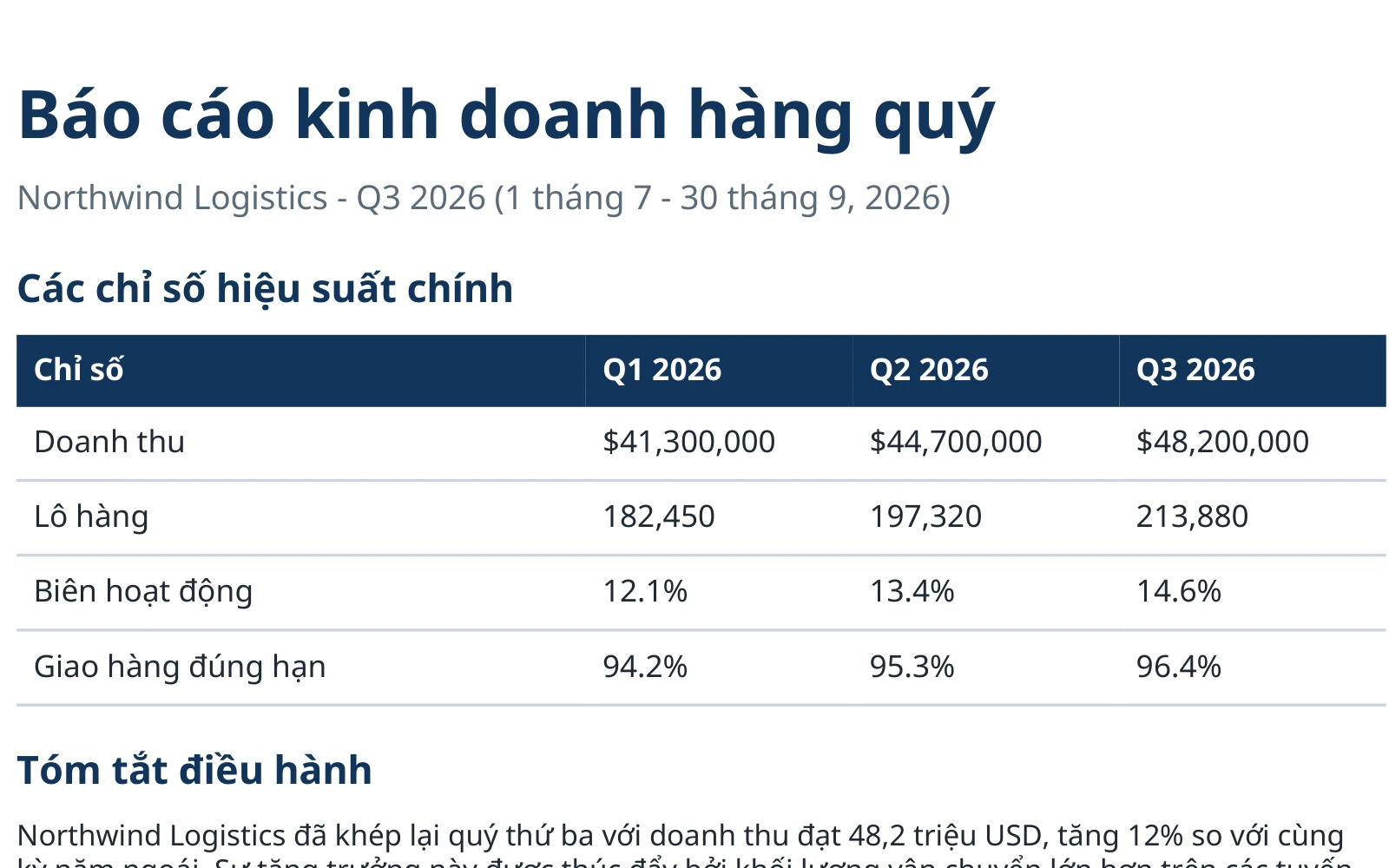
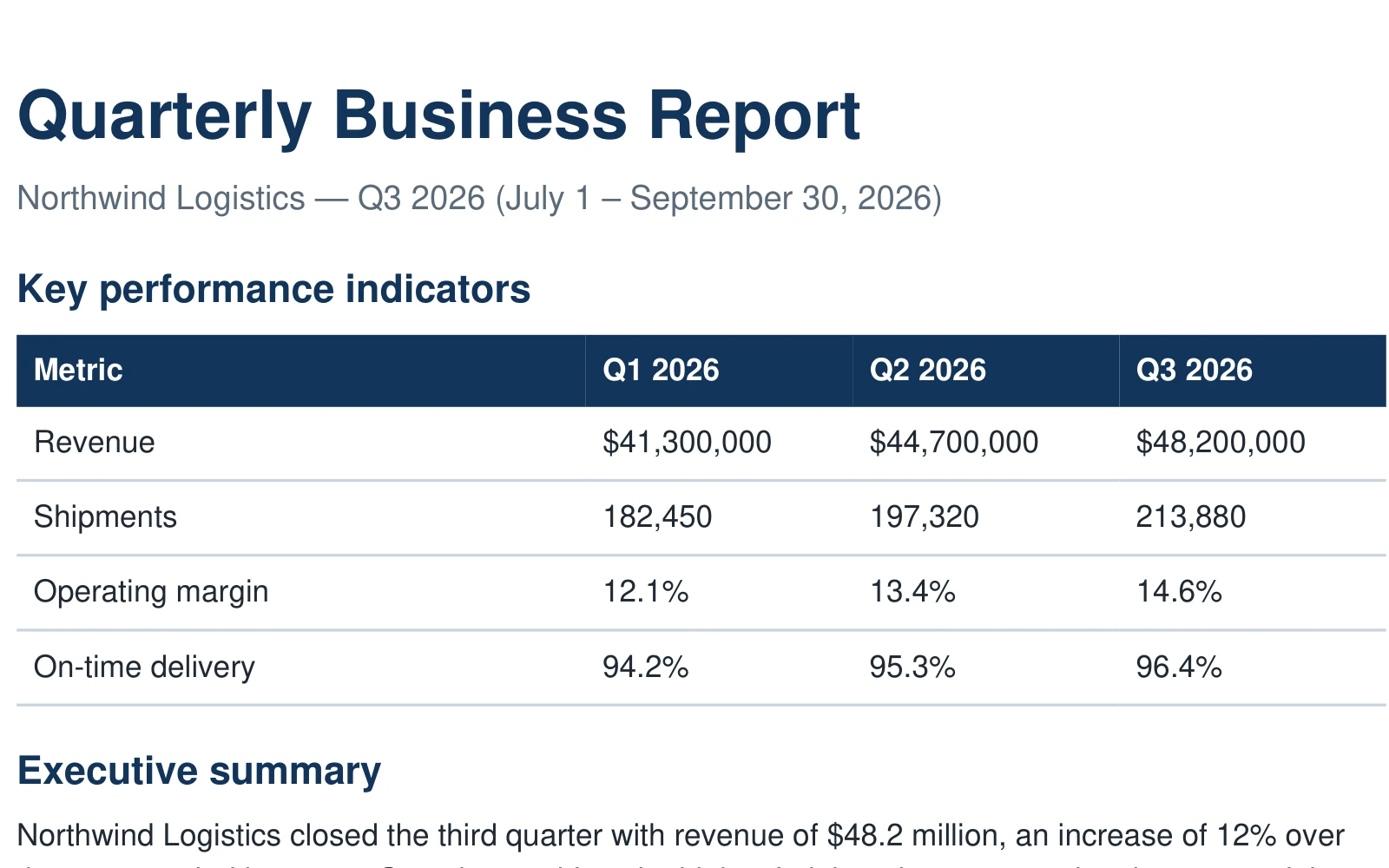
- 8
- document formats
- 76
- target languages
- 60 days
- files kept, then deleted automatically
- VND · USD
- VietQR or international card (Visa/Mastercard/Amex)
A closer look
Original and translation on the same page
Drag the slider to compare region by region: headings, tables, figures, captions.
- This is a sample document translated by Tranzlytic, shown as-is.
- Check the layout, tables and images before you decide to use it.
- AI translation can still make mistakes: read it again before sending or publishing.
Drag to compare with the original
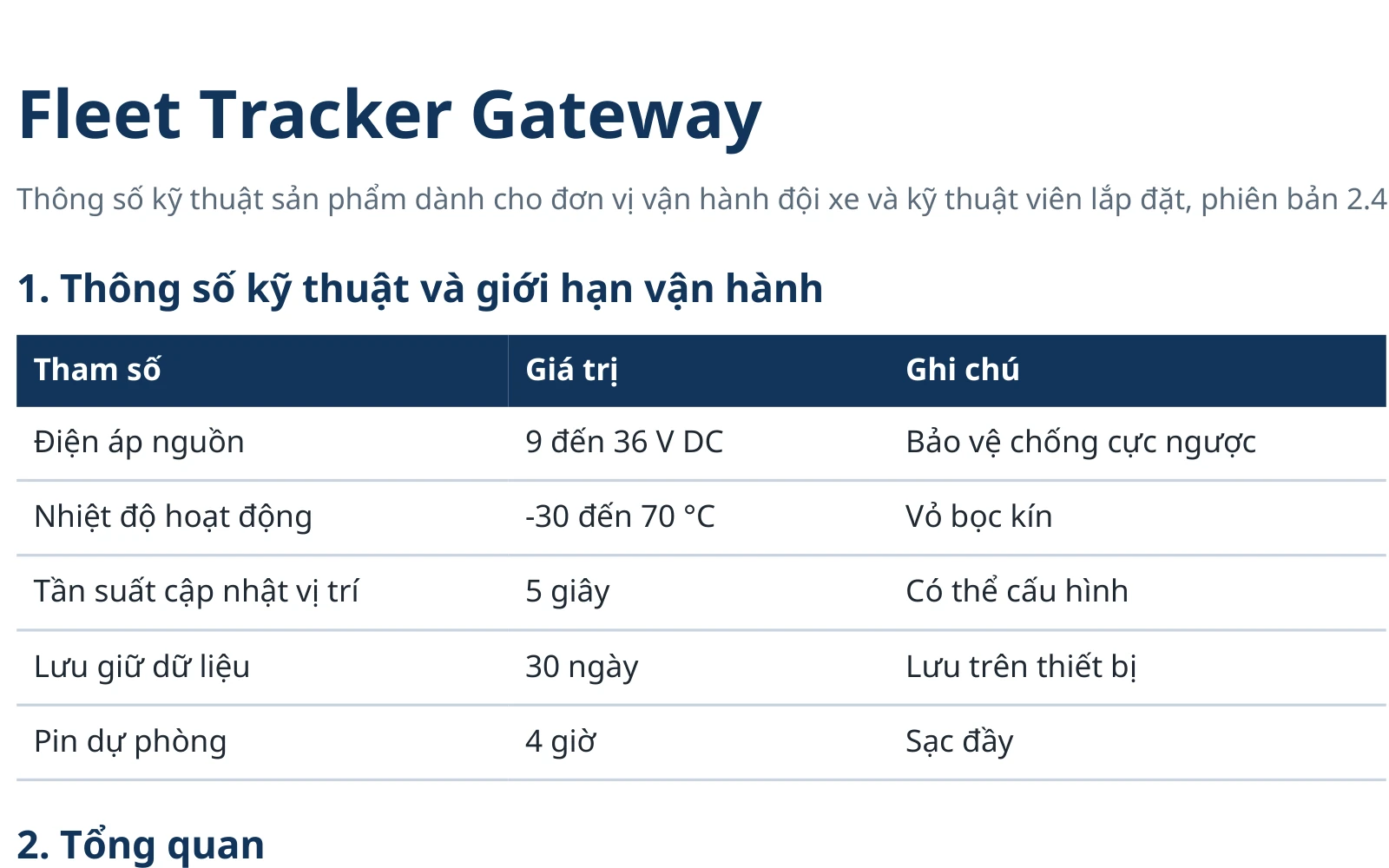
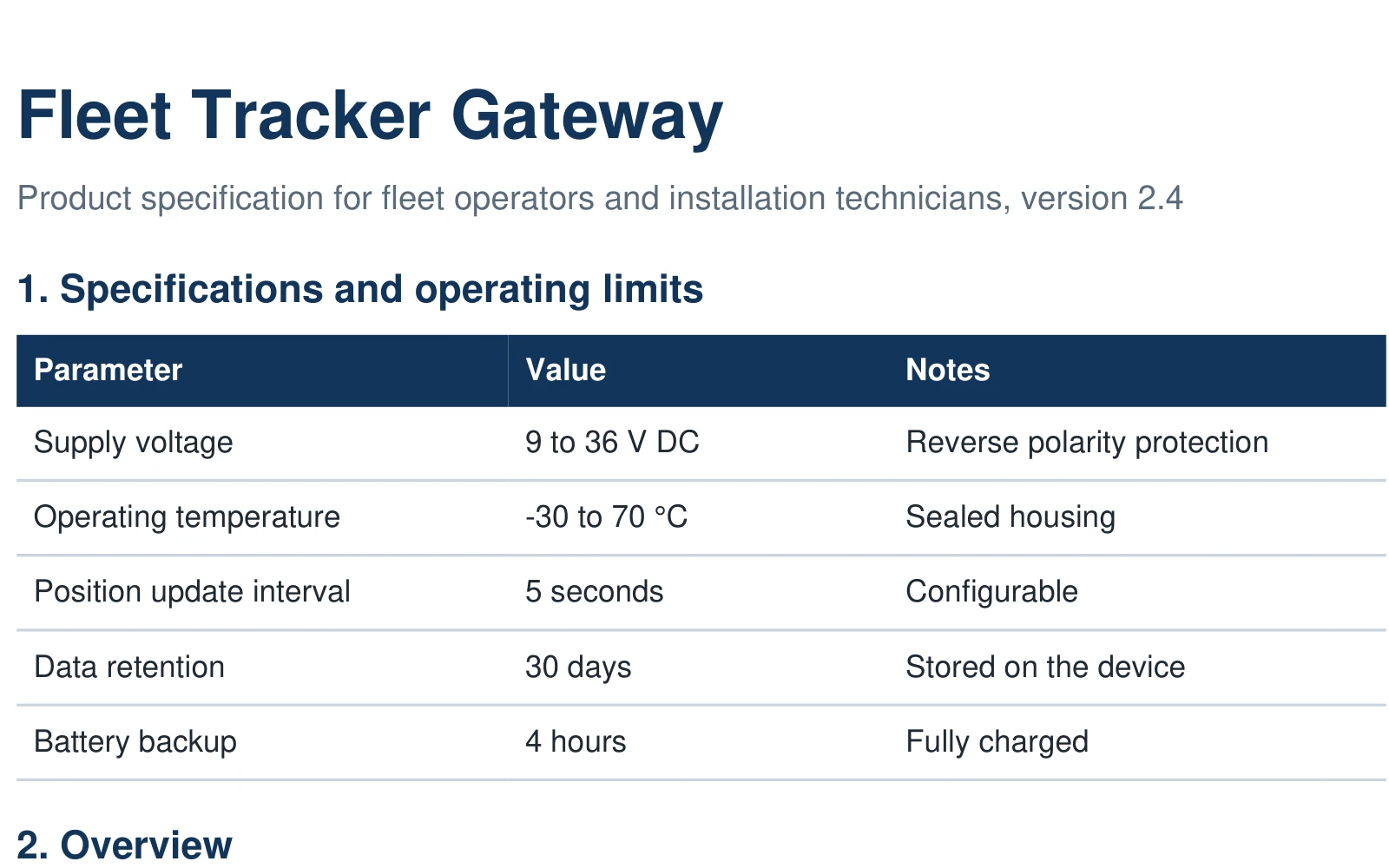
Features
What Tranzlytic can do
Every item below is a real capability of the product.
Layout preserved
Translation happens on the original file instead of exporting plain text: structure, tables, images and formatting stay in place, so the translated document is ready to use without rebuilding it.
- DOCX
- XLSX
- PPTX
- EPUB
- MD
- TXT
- SRT
Your own glossary
Create a glossary per project so terms are translated consistently, from contracts to technical documents.
Bilingual output
An optional output that keeps the original text and the translation together, handy for cross-checking, proofreading or language learning. Off by default.
- DOCX
- EPUB
- MD
- TXT
- SRT
Translate text in images
Turn it on to translate text in scanned PDF pages and images embedded in Word, PowerPoint and EPUB. Off by default; you only pay for pages and images that actually contain text.
20 credits per scanned page, 12 credits per image with text
Domain and tone
Pick your document's domain and add your own instructions so the AI chooses fitting wording.
- Legal
- Healthcare
- Finance
- Technology
- Education
- Business
SRT subtitles
Translates .srt files line by line, keeping the timestamps, with three style levels for subtitles.
- Faithful
- Natural
- Creative
How it works
Three steps from source file to translation
Nothing to install, it runs right in your browser.
- 1
Upload your file
Drag and drop PDF, DOCX, XLSX, PPTX, EPUB, MD, TXT, SRT. Up to 100 MB per file; upload several files at once and they are queued automatically.
- 2
Choose language and options
Pick the target language. Optional: glossary, domain, OCR for scanned PDFs, subtitle style.
- 3
Download the translation
Follow progress live, then download the translated file in the same format as the original.
Security and privacy
Where your documents go, where they sit, and for how long
We state what is protected and also what cannot be guaranteed.
We never sell your file content to third parties or advertisers. How your data is handled is set out in our privacy policy.
Read the privacy policyHTTPS in transit
The connection between your browser and Tranzlytic is encrypted with TLS.
Encrypted at rest
Uploaded and translated files are encrypted with AES-256-GCM on our servers, so even a leaked disk or backup cannot reveal your documents.
Used only to produce your translation
Personal documents or company paperwork — content is processed only to produce the translation: sent over HTTPS, isolated per account, decrypted only while translating. AI partners handle content under confidentiality agreements — Tranzlytic never sells, shares, or uses your documents for any other purpose.
Why only 60 days?
The longer files sit in storage, the higher the cost — and in the end you are the one paying for it. We chose 60 days: long enough to download and work with your translations, short enough to keep system costs — and your price — optimized. After that, a scheduled translation permanently removes both original and translated files, with no action needed from you.
Delete any time
Deleting a translation in History removes the translated file immediately; the original is cleaned up within 60 days at most. To delete your account and data, email [email protected].
Each account sees only its own files
Files and translation history are separated per account; every API access requires sign-in.
Pricing
Pricing
Start on the Free plan, upgrade when you need more credits.
What is a credit?
A credit is the unit translation is billed in. Each translation is priced by the number of characters actually translated (standalone numbers are free).
- 1,000 characters
- equal 1 credit, rounded up per file (minimum 1 credit).
- 2–3 credits per page
- for a text-heavy A4 page (about 2,000–2,500 characters). This is an estimate; the real number depends on the file.
- 20 credits / scanned page
- For scanned PDFs with OCR turned on, the charge is per scanned page instead of per character.
Estimates: a 12-page paper ≈ 30 credits; a 10-page bilingual contract ≈ 25 credits; A 10-page scan ≈ 200 credits. Actual credits depend on your file and are shown before you confirm — no hidden charges.
The Free plan adds a small watermark to translated files — layout and tables are preserved so the file is ready to use, with glossary for consistent terminology. Upgrade any time to remove the watermark and get more credits.
FAQ
Quick answers
Cannot find what you need? Reach us from the Contact page and we will reply by email.
How are my documents processed and stored?
Files travel over HTTPS and are stored encrypted with AES-256-GCM on the server; each account can only access its own files. Both the original and the translated file are deleted automatically after 60 days, and you can also delete a translation from History. Note: the content is processed by our AI partners under confidentiality agreements and is decrypted temporarily on the server while it is translated. The encryption key is held by the system, so this is not end-to-end encryption. Do not upload documents that your organisation's policy forbids sending to cloud services.
Which formats and file sizes are supported?
PDF, DOCX, XLSX, PPTX, EPUB, MD, TXT, SRT. Up to 100 MB per file. The Free plan adds a small watermark to translated files.
How are credits calculated?
1,000 characters of translatable text equal 1 credit (standalone numbers are free), rounded up per file, minimum 1 credit. A text-dense A4 page is roughly 2–3 credits (estimate). Scanned PDFs with OCR on cost 20 credits per scanned page.
How accurate is the translation?
We do not publish an accuracy rate because results depend on the language pair, the domain and the quality of the source file. AI can still be wrong, especially with specialised terms, numbers and scanned text. Use a glossary for fixed terms and read the result again before sending or publishing.
How long does a file take?
It depends on the file's length and complexity and on the queue at that moment, so we do not promise a fixed time. You can follow progress live and upload more files while the previous one is translating.
What is a glossary and is it required?
A glossary is a term list you define yourself, for example to fix how a product name or your company's legal terminology is translated. It is optional, but it keeps terms consistent in specialised documents. You can create several glossaries for different projects.
How do I change or cancel my plan?
You can upgrade to a higher plan at any time. To cancel, turn off renewal on the Plans page: the plan stays usable until the end of the period you paid for, and the rest of that period is not refunded.
Can scanned PDFs be translated?
Yes, when you turn on the OCR option while uploading (20 credits per scanned page). Without OCR, an image-only PDF is rejected instead of being returned untranslated. Vietnamese OCR quality is lower than English, so check the result carefully.
How do SRT subtitles and bilingual output work?
An .srt file is translated line by line with timestamps kept; you choose a faithful, natural or creative style. The bilingual option (original and translation in the same file) supports PDF, DOCX, EPUB, MD, TXT and SRT, and is off by default.
Translate your first document
Create a free account, upload a file and compare the result with the original. No credit card needed.